






I consider myself a reasonably technically competent person. I’ve built computers, worked with complicated equipment, and spent enough time troubleshooting technology to know that patience is usually rewarded. I also own a Bambu Lab H2C, a sophisticated 3D printer capable of producing some genuinely remarkable objects. With multiple colors, different materials, and an impressive amount of automation, it’s the kind of machine that makes you feel like the future has finally arrived in your workshop. Unfortunately, that feeling can disappear remarkably quickly when you discover that creating the object you want to print is an entirely different adventure.
Here’s the part nobody adequately explains when you’re shopping for a 3D printer: buying the machine doesn’t automatically give you the ability to design things for it. You can spend thousands of dollars on hardware, load it with beautiful filament, and still find yourself completely defeated by something as seemingly simple as fixing a character’s hand. I’ve been there more times than I’d care to admit. In fact, if frustration generated electricity, my adventures in 3D modeling could probably power a small neighborhood.
That’s why Google’s latest announcement caught my attention. The company recently demonstrated its Gemini AI assistant operating sophisticated software on a Mac, including a creative workflow involving Blender. For someone who has spent countless hours trying to make Blender cooperate, the possibility of telling an AI assistant what needs to be done instead of personally navigating a maze of unfamiliar tools sounds almost too good to be true. And as we’ll discover, there’s a reason to approach that promise with cautious optimism.
The Printer Is Often the Easy Part
Modern consumer 3D printers are extraordinary machines. My Bambu Lab H2C can handle complicated prints, manage multiple filaments, and produce objects that would have seemed impossible for a home workshop not very long ago. Bambu Lab deserves credit for making the actual printing process considerably more approachable than it used to be. Once you have a properly designed model, the printer and its companion software can handle an impressive amount of the work.
But there’s a catch hiding behind all that automation. The printer doesn’t know what you’re imagining. It doesn’t understand that the hand on your figurine should have five fingers, that a jacket should be a different color from the shirt underneath, or that two pieces are supposed to move independently. It simply follows the instructions created from the digital model you give it. If that model is a mess, you’ve essentially purchased an extremely sophisticated machine for reproducing your mistakes in plastic.
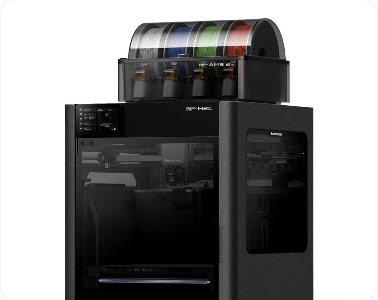
For someone who downloads ready-made models from a website, this may never become a serious issue. There are thousands of excellent designs available, and many can be printed with minimal preparation. My interests, however, tend to involve custom parts, personalized objects, and designs that don’t already exist. That’s when the limitations of being a printer owner rather than a trained 3D designer become painfully obvious. I can usually describe exactly what I want. Getting software to produce it is another matter entirely.
AI Reconstruction: The Magic Trick With a Catch
One of the most exciting developments in 3D printing has been the arrival of AI-powered modeling services such as Tripo. The idea is wonderfully simple: provide a photograph or description, and artificial intelligence attempts to create a three-dimensional object from it. You can rotate the result on your computer screen, inspect it from different angles, and sometimes export it for use with a 3D printer. For anyone without traditional modeling skills, this technology feels like a tremendous breakthrough.
I’ve experimented with this workflow extensively, and I can tell you that the initial results can be astonishing. A photograph becomes a recognizable character, complete with clothing, facial features, and accessories. It’s exciting right up until you start looking closely enough to prepare the object for printing. That’s when you discover that AI has a rather creative interpretation of human anatomy, physical construction, and the relationship between objects that should never have been fused together in the first place.
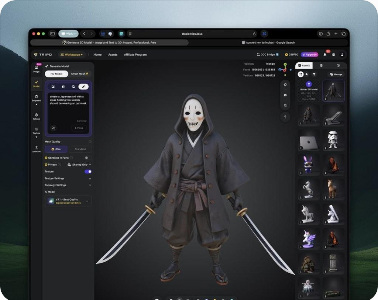
One of my recent projects involved creating a custom bobblehead. The overall character looked promising, but one hand became a strangely shaped lump that resembled a small dinner roll. Attempts to correct it didn’t necessarily make things better. At one point, simply hiding the offending hand inside the jacket seemed like a perfectly reasonable engineering solution. That’s not exactly the creative freedom I envisioned when I invested in advanced 3D-printing equipment.
These problems aren’t necessarily evidence that the AI is defective. Reconstructing a complete three-dimensional object from a flat photograph requires the software to invent information that the photograph never contained. It has to make educated guesses about hidden surfaces, depth, geometry, and the way individual components connect. Sometimes those guesses are remarkably convincing. Other times, your character ends up with an anatomical feature better suited to a bakery.
Blender: Where Simple Fixes Become Advanced Neurosurgery
Eventually, most ambitious 3D-printing enthusiasts encounter Blender. It’s free, incredibly powerful, and capable of producing professional-quality 3D models, animation, visual effects, and digital sculptures. Artists use it to create things that are genuinely breathtaking. It’s also one of the most intimidating applications I’ve ever attempted to learn, and I don’t consider myself particularly afraid of complicated software.
Trying to repair an unfamiliar 3D model in Blender sometimes feels like being handed a neurosurgery textbook and told to perform brain surgery before lunch. The instruments are all there, the operating room is fully equipped, and somebody assures you that the procedure is actually quite straightforward. Unfortunately, you have no idea which instrument to pick up, what half the terminology means, or why the patient suddenly has three extra holes in his head.
I’ve spent hours experimenting with Blender’s remeshing tools, smoothing operations, and geometry settings, trying to correct surfaces that look perfectly reasonable until you examine their underlying structure. I’ve changed settings, repeated operations, watched tutorials, and occasionally discovered that the adjustment I thought would fix everything accomplished absolutely nothing. A task that sounds as simple as smoothing a surface can require understanding how thousands of tiny polygons interact with one another.
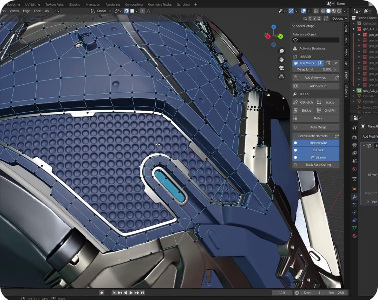
For readers unfamiliar with 3D modeling, imagine covering an object with thousands of tiny interconnected triangles. Those triangles form the digital skin of the model, known as a mesh. Blender gives you powerful tools to reshape, repair, combine, separate, and rebuild that geometry. Unfortunately, understanding how to manipulate it correctly is a skill in its own right. Knowing that a character’s face needs smoothing is easy. Knowing which operation will smooth the face without destroying the eyes, nose, and mouth is where the education begins.
And that’s what makes Blender so frustrating. It’s not bad software. Quite the opposite. It’s extraordinarily capable software designed to give experienced creators an enormous amount of control. The problem is that many of us don’t want to become professional 3D artists. We want to fix a handful of obvious defects, adjust some colors, and print the object we already spent hours creating. There is a considerable gap between those two ambitions.
Where Is the Beginner-Friendly Software?
This is the part of the 3D-printing industry that I find particularly disappointing. Consumer printers have become dramatically more sophisticated and easier to operate, but the software needed to repair complicated models hasn’t experienced the same transformation. There are beginner-friendly design programs, including tools intended for creating simple shapes and mechanical objects. Some are excellent for that purpose. But there’s a huge difference between designing a basic bracket and repairing an AI-generated figurine with tangled geometry, intricate clothing, and poorly defined color boundaries.
What I want isn’t another professional modeling suite with a thousand features I’ll never use. I want a straightforward way to select a character’s hand, separate it from the jacket, clean up the surface, and tell the software where one color ends and another begins. That doesn’t sound unreasonable, particularly when manufacturers are selling printers specifically designed to produce sophisticated multicolor objects. Yet accomplishing those tasks can require bouncing between several applications, each with its own terminology, limitations, and learning curve.
Bambu Studio, the software I use to prepare models for my H2C, is an excellent example of both how far we’ve come and how far we still have to go. It’s very capable when it comes to arranging objects, preparing supports, selecting materials, assigning colors, and generating the instructions that run the printer. But its tools for repairing complicated AI-reconstructed geometry and establishing clean color boundaries remain limited compared with what users actually need for these projects.
I’ve encountered models containing enormous numbers of tiny triangles, where the software’s color-filling tools produce jagged boundaries instead of the clean lines I want. Imagine trying to paint a straight stripe across a surface made of thousands of irregular puzzle pieces, only to discover that the software insists on following the edges of those pieces. I’ve wished repeatedly for a straightforward way to draw a clean boundary and tell the program to respect it, regardless of how the underlying geometry happens to be arranged.
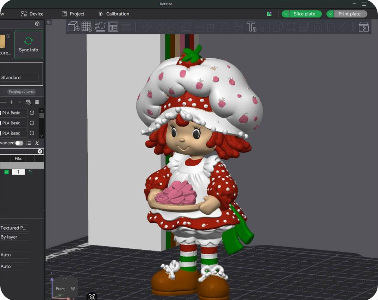
To be fair, Bambu Studio is primarily a slicer, not a full-featured 3D modeling application. Its main job is to translate an existing model into instructions a printer can understand, and it generally performs that job very well. But as AI-generated 3D models become increasingly popular, I believe manufacturers have an opportunity to make model cleanup much more accessible. A printer that can produce beautiful multicolor objects deserves software that makes preparing those objects less of an ordeal.
Now Google Wants Gemini to Operate the Software for Us
Google’s announcement introduces an intriguing possibility. Rather than expecting users to learn every command and menu in a complicated application, its Gemini computer-use technology can interact with desktop software on their behalf. The company demonstrated an AI-assisted creative workflow involving Blender, turning a child’s butterfly drawing into a three-dimensional model and rigging it for animation. That’s a noteworthy achievement, especially considering the complexity of the software involved.
The concept is different from simply asking a chatbot how to accomplish something. Instead of giving you a lengthy set of instructions and wishing you luck, an AI assistant with computer-control capabilities can potentially perform actions inside the application itself. It can navigate interfaces, select tools, enter information, and work through a sequence of steps. For someone like me, who understands the result I’m trying to achieve but doesn’t always know how to accomplish it in Blender, that could be a significant improvement.
The accompanying image shows a separate example of AI-assisted work involving LM Studio and Autodesk Maya, another professional 3D application. It illustrates how AI can interact with sophisticated creative software, but it is not a screenshot of Google’s Gemini demonstration.
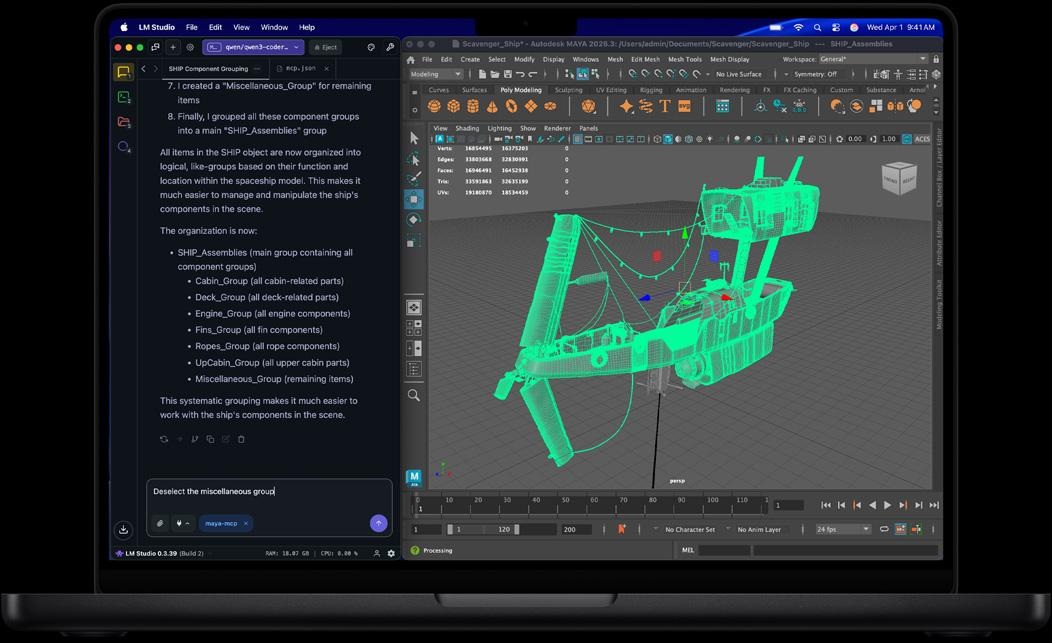
Think about how useful that could eventually become. Instead of spending an evening trying to remember which Blender operation separates overlapping geometry, you might describe the problem and ask the assistant to handle it. Instead of searching through tutorials to understand how to repair a damaged mesh, you might ask the AI to inspect the model and suggest an appropriate correction. Even if the technology only handles routine operations reliably, it could save hobbyists an enormous amount of time.
But there’s an important distinction between demonstrating that an AI can operate Blender and proving that it can solve every problem Blender users encounter. Those are not the same thing, and anyone considering this technology for 3D printing should understand the difference.
Can Gemini Actually Fix My Models? Not Necessarily.
Here’s where my enthusiasm meets reality. Google’s demonstration shows that Gemini can assist with a creative workflow inside sophisticated software. It does not prove that the system can take a badly reconstructed Tripo model, identify every geometry defect, separate improperly connected components, repair distorted anatomy, correct jagged color boundaries, and deliver a flawless multicolor model ready for my H2C.
That would require more than simply knowing which buttons to press. The AI would need to understand what the object is supposed to look like, how its components should fit together, and which changes would preserve the intended design. Some of those decisions are difficult even for experienced human artists. An AI assistant might successfully perform individual operations while still making a poor judgment about the overall model.
There’s also the distinction between an attractive digital model and a printable object. A character can look wonderful on a computer screen while containing geometry that produces slicing errors, fragile features, unsupported sections, or pieces that can’t be assembled correctly. Printing adds physical constraints that don’t necessarily matter when the goal is simply to display or animate a digital creation.
In other words, Gemini may be able to operate Blender, but it hasn’t been demonstrated as a dependable, one-click repair solution for the problems that have consumed so much of my time. It isn’t replacing Blender, and it isn’t replacing the judgment required to create a properly constructed 3D model. It’s potentially making some of that work easier to perform.
That distinction matters because the technology is exciting enough without promising miracles it hasn’t yet delivered.
Would I Actually Use It?
Absolutely, assuming it eventually becomes available for the computer and workflow I use. Google’s initial rollout is focused on compatible Apple Silicon Macs with eligible paid Google AI subscriptions, so Windows-based users shouldn’t assume they can simply install this particular feature today. Google’s official announcement provides the current availability and setup details.
I’d also approach it with realistic expectations. My first experiment wouldn’t be asking Gemini to create an elaborate character from scratch. I’d start with one of the annoying problems that routinely derail my projects: separating two objects that have become fused together, smoothing a damaged surface without destroying nearby details, or making a precise change to a model that otherwise looks good. Those are the kinds of practical tasks that would determine whether this technology is genuinely useful to people like me.
And I’d certainly inspect the results before sending anything to the printer. AI assistants can misunderstand instructions, and a computer that confidently performs the wrong operation is not necessarily an improvement over a human who spends ten minutes looking for the right one. At least when I make a mistake, I usually know who to blame.
The Real Opportunity Isn’t Replacing Artists
I don’t expect artificial intelligence to eliminate the need for talented 3D designers, nor do I think it should. People who have mastered Blender possess valuable skills developed through years of practice, and the quality of their work reflects that experience. If anything, my own attempts to use the software have given me considerably more respect for what professional artists accomplish.
What excites me is the possibility of making some of those tools accessible to people who have ideas but lack the specialized training to execute them. There’s an enormous population of hobbyists, inventors, small-business owners, and ordinary consumers who could benefit from 3D printing if creating and modifying models were less intimidating. Not everyone wants to become a digital sculptor. Some of us simply want to make something useful, interesting, or personal without devoting the next six months to learning professional software.
For all my complaints, I genuinely enjoy 3D printing. There’s something uniquely satisfying about imagining an object, creating it digitally, and watching a machine bring it into the physical world. I’ve learned a tremendous amount through trial and error, and even the frustrating projects have taught me something. But I also recognize how much time I’ve spent fighting the tools rather than creating the things I wanted to make.
If Google’s Gemini technology eventually reduces that barrier, it could become one of the most meaningful improvements to the hobby since consumer printers became reliable enough for everyday use. We’re not at the point where AI can be trusted to fix every ugly mesh, straighten every color boundary, or rescue every anatomically questionable figurine. But the idea of software that understands what I’m trying to accomplish, and can help perform the tedious steps required to get there, is enormously appealing.
Until then, I’ll keep printing, experimenting, learning, and occasionally staring at Blender as though it just asked me to perform an emergency craniotomy with a butter knife.
And if somebody develops a reliable button labeled “Fix This Mess,” I would very much like to be first in line.
What about you? Have you tried creating 3D models with AI, or spent an evening battling Blender over something that should have taken five minutes? Would you trust an AI assistant to repair your models, or do you prefer having complete control? Share your experiences in the comments. I’m particularly interested in hearing from anyone who has found a genuinely beginner-friendly way to clean up AI-generated 3D models.