GOTW #6: JumpyBall!

Yes I know its late by a few days, but what can i say? I suck… BUT JumpyBall doesn’t! It is amazingly entertaining for a game that can do half of the challenge for you! Yes you can make the JumpyBall AUTOJUMP! AWESOME! 🙂 The object of the game is to stay on the paths … Read more

GOTW #5: Brain Games vs Brain Evolution

You heard it right, this week I’m pitting two of the better phone  software companies out there (in my opinion anyways) on each of their own “Brain Games”.  image

First a look at SPB Brain Evolution.  Starting off, you’ll think “who is the golden man?” maybe a trophy from the old Bond movie Goldfinger but no, he is just jolting your brain so that you are ready for all the goodness that is to follow!  The game comes with 10 games, which (like games like Brain Age for the DS) you have to play the lower level games to unlock the higher level games.  The games are: Arithmetics, Quadronica, Memorics, Sudoku, Numbers, Minesweeper, Balltracker, Guess Who, Encyclopedia and Matches.  I’ll get into more detail for each game later in the review.  I do like this style of game play, but at the same time I don’t.  I’m too impatient to wait for all of the games to be unlocked.  I also forget to play sometimes and feel that i missed out on something.  The games that I have unlocked (Arithmetics to Minesweeper) are all very good and the more you progress the more difficult they are so they don’t just stay on the easy level forever.  There are user profiles, so you can let whoever you want play and they wont screw up your game and there is also a  “Interesting Facts” section; which is … interesting.  You can also set your “brain mark” which for me is currently at “Student.”  image
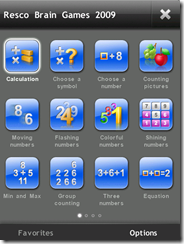
Now lets see Resco Brain Games.  The first thing you’ll think about this is “Wow, iPhone-ish  interface” and then you’ll remember that the iPhone is just a glorified app launcher and WinMo phones will always rule.  :)  Game selection here is amazing! there are 44 games to choose from and they are divided up into 4 categories; Calculation, Memory, Analysis, and Attention.  So less of the more “popular” games like in Brain Evolution, but more games that seem to really work your brain.  And if you’re reading this I’m sure your brain needs some work!  The games are a load of fun and aren’t as easy as you may think.  They get progressively harder as you move on per level of game.  Oh i forgot to mention, most games have at most 10 levels (at least 6) so that makes about 400 different games that you’ll run into.  For example, on “Calculation” level 1 is simple adding and subtracting where level 5 is multiplication and division.  You can also choose a profile for this game, but the options are pre-defined for you as “Default”, “Green” and “Red”.  And for statistics you get charts for overall progress, daily and per category which is nice to see.

Read on to get my recommendations and see who wins the fight.

Read more

GOTW #4: Worms! WAIT I mean Snails!!!!

You’re reading this right, Snails!  Now if you’re thinking “Oh great, some cheap knockoff!” BITE YOUR TONGUE SIR (or Madame) This game is GREAT! and how they don’t get in trouble for copying Worms! I have NO idea!  To start off, all I did was try out the Trial and let me say that it has enough game play to last a long time all by itself.  It comes with 3 stories, Moogum’s Diary, Ms. Lupeez Wild Ride and Nooginz in the Hood.  And then each story comes with 3 levels to play so all in all you get 9 levels to toy with before you buy it.  Oh and did I mention that it only costs $2.99???? (Worms costs $6.99) depending on your carrier).  

So lets take a look at game play.  Even though it is not “designed” for VGA(neither was Pipes but that was fun anyways!) it still looks nice and you can easily make it through the game without a stylus(but for some parts its easier to use it).  The ONLY part that i have seen where you really need a stylus(or small fingers) is when moving around the level  it is do-able with your fingers, but not as easy.  There is the small box in the top right that shows the full board.  You move the box around the level with that and it moves your main screen.  The graphics are classic Worms/Snails and dont even get me started on the Audio.. HILARIOUS… every once and a while you’ll get a fart or giggle or something random when you click on the links.  And then there are the worlds that you can play in! Just on the trial(i don’t know if the full version has more) you get 6 different environments! for FREE!  And for weapons you start off with a pistol, shotgun, machinegun, minigun, bazooka, bombs, Grenade,  tnt, frog, air transport, flea, grasshopper, worm and anvil.  All great stuff.  And then the comments… “Guffie has a big mouth, he keeps saying its his turn” or “Pookie almost feels bad about killing Noogie” … Priceless!

So what are you doing sitting there reading this? Go download it now!! and have fun and discuss it in the forums!

Read on for a ridiculous amount of screenshots! 🙂


Read more

SPB Releases SPB TV 1.0 and WE Review it!

From the company that brought us great software image like SPB Mobile Shell (3.0 soon we hope!), SPB Keyboard and SPB Weather come SPB TV 1.0!  This is the stand alone version of their TV Viewer which is currently packaged into their SPB Online package.

Spb TV is a mobile client, which allows viewing TV channels on Windows phones.
The uniqueness of this application is in its unparalleled usability, and the overall seamless experience of watching TV on a mobile device. Spb TV allows quickly checking the TV guide and previewing shows for each TV channel, without having to quit the current channel. Moreover, the convenient on-screen controls allow adjusting volume, backlight, and more.

Main Features:

  • Unique TV browser with quick channels preview and list of current & upcoming TV shows for fast channel selection
  • Integrated full week’s TV guide
  • Ability to set Outlook reminders for TV shows of interested
  • Fast channels launch and switching technology
  • Picture-in-picture mode (channel preview while in another channel)
  • Finger-friendly onscreen “transparent” controls with instant access to regular TV features
  • Full support of hardware buttons controls
  • Network bandwidth fluctuations support
  • Clever integration of mobile TV functionality with other mobile phone features

So what are my thoughts? Its good! Really good… The channel quality is nice, the audio comes through clearly and the interface is nice and finger friendly.  What’s the bad? Nothing really.  Its pretty good for a “new” piece of software.  I say “New” because as mentioned before it has really just been extracted out of their SPB Online package.  It is being released for $14.95.

Read on for the full press release and MobilityDigest’s full review and screenshots!

Read more

WinMo Marketplace Screenshots and info released

The guys over at 1800 PocketPC found some nice info and screenshots from CNET about the new Windows Marketplace. Some details included are: 24 hours to return any application they purchase for a full refund. purchased on the phone or through a Web site billing handled by credit card or through the wireless carrier’s bill … Read more

GOTW #3: Xtrakt!

Now you may be thinking to yourself… Hmm… Isn’t that game from the Sony Xperia? Yep! and leave it to itje to extract it and CR7KB24 to let everyone know that it works very well on the Touch Pro and HD!

Starting it up you’ll notice that it is done RIGHT… it loads fast and its great to see the Sony Ericsson splash screen show right up…  On the first loading screen you can notice the problem though… It was originally designed for WVGA, so you lose some of the screen on the Touch Pro.  Good thing they designed it to run in the middle of the screen though because you do lose some scores and the exit button is kind of tricky, but you can still play the whole game.

The game is pretty simple.  You’re driving a motorcycle through a city avoiding/shooting the enemies and roadblocks on your way.  You move your guy from left to right with your stylus/finger and then click the enemies with the stylus also.  You win by surviving! 

The game is created by Southend Interactive but they do not list anything on their site but with all the news online about the game, that may change.  THIS game is HUGE proof that the Touch Pro/HD can handle great games like the iPhone can, people just need to get DEVELOPING!

I do have the Ati 3D drivers installed, so that may help but apart from that there aren’t any special tweaks you have to do.  Go download and play!  As ALWAYS, follow along in our Forums!

Read on for some more screenshots!

Read more

Official Youtube App for WinMo By GOOGLE!

Dont want to use the built-in YouTube app on your HTC phone? Dont have a HTC Phone that has the YouTube App on it? Think the standard YouTube app is slow or not good? Well then look no further! With the help of Google and Microsoft there is a new YouTube App that seems to be running Silverlight!

Notice the new icon in the image. It installs the link at “Youtube.lnk” so i renamed it so it would look better.  But the icon actually looks a little pixilated.  But other than that its pretty slick.  BUT when playing a movie and exiting it locks my menus in lanscape… which is WEIRD! Oh and dont worry about the blank space… that’ll come later…

It seems to be very finger friendly and also runs a lot faster than the version that came on my Fuze.  The best part is that it warns you that “YouTube streams a lot of data while playing videos.” so Yes be sure you have a data-Plan.

Problems Found:

1 – screws up your orientation when quitting while playing a video

2 – CRAZY small menu (see pictures below for both)

3 – Sometimes you cant go back to the main screen after starting a video.  So be sure its the one you want to play!

Check below for pictures of the installation and browsing some videos and also the bugs that I found.  And follow along in our Forums.

Via WMExperts

Read more

WinMo 6.5 loses the HoneyComb after alot of Buzz

Get it? … yeah its lame, but it looks like it did happen.  Ars Technica has reported via a MIX09 event that they are dumping the honeycomb and making the incons bigger.  See the video below at about the 6:50 mark. (Silverlight is required) Looks very interesting and alot smoother than the current releases of … Read more

HTC Device Specs Leaked Out!

From one of our many resources hidden deep within the “bush” we bring to you a spreadsheet with some handy info on it… All the specs, names and chipsets of the upcoming HTC releases. WMPoweruser.com reported earlier on the leaked releases of these, but now we get to see some more names and specs.  Its … Read more

Top 10 things we hate about the Fuze!

Now this isn’t something that you would normally hear from a winmo/fuze/ppc site, but we figured it would only be fair to look at our own toys to see what we hated the most about them and for your convenience we have posted links to most if not all of the fixes to the problems below in our forums!  As always, be sure to let us know how or where we messed up and how stupid you think we are…

10. TP2/Fuze2? WTF HTC? Why do you launch a great phone and THEN launch essentially the SAME great phone that quick! This is hardly something to hate, but dont get like apple! Next phone from them may have NO SCREEN!

9.  GPS. Does it work? Well it does sometimes. From a cold start it’s a few minutes. Sometimes it won’t start at all and we need to use third party apps to warm it up a bit. We didn’t have to do this with past phones so it’s time for HTC to fix it.  It’s a cell phone first, but HTC doesn’t need to ignore the features in its own product.

8.  Battery Life. Yup, it’s a Windows device so you can make it through the day…and run home to get it on the charger. It is better than past devices but if 3G is on with push email we all know at some point during the day we will be thinking about if we’re going to make it.  We don’t even have to mention GPS or WiFi.  Once that starts up you can watch your battery drain!

7.  The Camera. Don’t get us wrong, the 3mp camera is really great in bright light. Especially when things aren’t moving too fast(or at all). If you’re in low light and arms are waiving you may as well not embarrass yourself and just leave the phone in your pocket. Yes, I know it’s a cell phone, but I still feel that they can work out a little more functionality here to get less lag.  And the flashes on most cell phones leave much to be desired… the LED “flashes” make people look like ghosts. Some fixes for these problem are here.

Keep reading to see the rest!!!

Read more