



Asus Eee Netbook Now $229.99 At Best Buy

Being that this is PPC Mobility (PPC = Pocket PC) we think there has got to be a pocket about 8.9″ somewhere waiting to sport the Asus Eee Netbook! And priced $229.99 (after $100.00 rebate) at Best Buy’s Outlet Center, someone would surely make it fit! The Asus Eee comes packed with the following: Product … Read more

Increase the Size of Your Screen (no Scrollbars)

The more I played around with Sensor Scroll on my Fuze (which activates the scroll wheel around the dpad in all applications where there’s a vertical scroll bar) the more I realized that I don’t need a vertical scroll bar on the screen, especially when you consider that we also have Touch Flo at our … Read more

MIO MID Jumps Into The Windows Mobile Rat Race

With HTC Clearly leading the way in Windows Mobile Devices, seeing MIO’s MID is quite a breath of fresh air. While some have all but wrote off Microsoft Windows mobile for a variety of reasons, there seems to be no present backing away from this platform by Device Manufacturers. that being said, MIO has dropped … Read more

HTC 2009 Roster Leaked: Could The Rhodium Be The Touch HD Pro?

Can you say HTC Touch HD PRO! Since the dawn of the HTC Touch HD, Us slide out keyboard freaks have been dreaming of the possibility of a PRO version to the Touch HD. And it looks like 2009 will see it happen! First, Arlen over at PPCGeeks.com got the goods on the whole HTC 2009 OEM Product List and made it public. There are a ton of devices coming down the pipes to get your mouth watering, but clearly, one stands out from the pack! Called Rhodium, this five rows of slide out QWERTY Keyboard bad boy looks to have the screen we all know and love from the Touch HD. HTC looks to make the Rhodium goodness available to some carriers as well calling their version the Tungsten. (Pictures after the break)

All this HTC goodness by PPCGeeks came to us via wmpoweruser.com

Read more

Windows Mobile Browser Comparison

There is no doubt that things have really gotten interesting in the Windows Mobile Browser war. Of course we were treated to Opera Mobile that came embedded on the AT&T Fuze & HTC Touch Pro to make better use of the this powerful devices capabilities. The severely underpowered Pocket Internet Explorer, which has been a … Read more

Send Text Messages Through Email

Here’s another little known fact (unless you’ve been around long enough to know it:)) which I saw was dug up the other day. If you don’t have an unlimited text messaging plan but you want to Send text message Online you can do it for free – by sending an email. All you do is send … Read more

See More of Your Phone on Your PC

Many of you have realized that when connecting your phone over ActiveSync the Windows directory cannot be seen and there are other files that are hidden. Because of this, we’re often forced to do a lot of the changes on our phone using File Explorer or using apps like TotalCommander. There have been plenty of times where going to the Windows directory is needed (like changing the programs located in the Programs directory). Well Rainfreak of PPCGeeks was kind enough to give a set of step by step instructions on how to change this on our PC so we can see all files and the Windows directory and it’s actually embarrassingly easy.

Read more

Windows Live Search Mobile Gets Update Version 4.0.12158.1

One of my “Must Have” Applications just got even better! Windows Live Search Mobile just got updated to Version 4.0.12158.1. So what’s new? The first thing you’ll notice is the (Locate Me) when you first open WLS. Just like Google Maps, Windows Live Search can now tell you approximately where you are based on the cell phone towers. So if you do not have a built in GPS like us (Don’t be hatin’) you can still find out where you are.

So with this new update, WLS, which was always my favorite, begins knocking a little harder on Google Maps Door. Of course a feature that WLS has that Google Maps does not, is Voice Recognition. I have always liked this ability, especially when driving. The WLS interface is very well laid out and using the categories list helps locate Hotels, Restaurants, and other POI’s very easily.

But wait! What’s this? Here is yet another little value added to Windows Live Search that I did not count on! It’s called Bird’s Eye and as you can see it is located by clicking Menu, then clicking View when you are looking at a map! I got some pictures after the break for everyone to look at.

So if you haven’t already, you need to head on over to the Windows Live Search for Mobile website and download this latest version for your device! It is now solidly placed in my must have applications closer to the top!

You can download Windows Live Search Mobile by heading on over to the website or just clicking here.


Read more

Conduits Technologies Releases Pocket Player 4.0

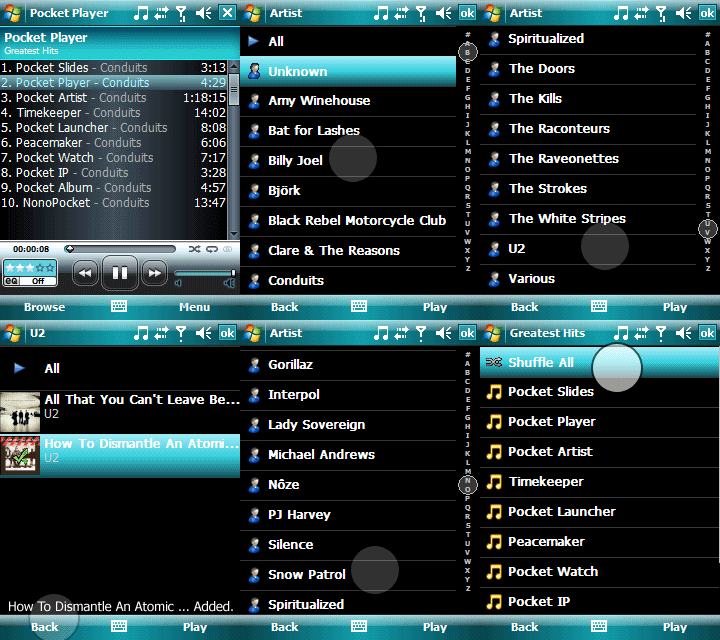
One of the most popular third party media players, Conduits Pocket Player just released a new version Pocket Player 4.0. The Award Winning Pocket Player, which won the “Best Audio at the 2008 Smartphone and Pocket PC Magazine Best Software Awards for its Pocket PC and Smartphone editions”  really made some significant improvements. Here area few:

Pocket Player 4.0 introduces AAC and M4A playback and podcast subscriptions, as well as enhanced MP3 support and other improvements. Pocket Player 4.0 is fully compatible with all Windows Mobile 6.1, Windows Mobile 6, and Windows Mobile 5.0 devices.

If you enjoy your Windows Mobile Device as a music player and have been looking for a better application to listen to your music with, then Pocket Player needs to be on your list to test out! Pocket Player has a free trial so you can see for yourself just how good it is.

I got a ton of information about Pocket Player after the break including Conduits upgrade policy if you happen to have an older version and want to take advantage of these new features. There is also a download link. Pocket Player 4.0 is available now to purchase for $19.95.


Read more

Cool Color Icons For Your Taskbar

So you got your favorite theme running on your Fuze and you think life is good. It just can’t get any better than FuzeBerry or HTC Fuze Flip Clock V7b1. But how about showin’ your taskbar some love and make those dull HTC Icons go away in place of some very cool Color Icons? Well Check this out then:

That’s right, you can now trick out your Taskbar with these very cool color icons from massi959 over at XDA Developers for free! It’s a really simple cab file that you just download and save to your storage card for later use if necessary. Run the file from where ever you saved it and install to your main memory. The file is rather big at 4400K but with all the memory real estate we have with the Fuze/Touch Pro, it’s no problem.

There are two files to choose from:

Colored Top Bar WWE ST.cab which will keep your standard call registry icons.

or

Colored Top Bar WWE Call.cab which will replace your standard call registry icons with this:


Jump after the break for more of my screen shots showing off my new Taskbar and Call Registry!

Thanks to massi959 over at XDA for hookin’ us up and for AllTheWay from wmpoweruser for catching it!

Read more